<?xml version="1.0" encoding="utf-8"?><feed xmlns="http://www.w3.org/2005/Atom" ><generator uri="https://jekyllrb.com/" version="3.10.0">Jekyll</generator><link href="https://bobbywatson100.github.io/feed.xml" rel="self" type="application/atom+xml" /><link href="https://bobbywatson100.github.io/" rel="alternate" type="text/html" /><updated>2026-05-06T00:18:12+00:00</updated><id>https://bobbywatson100.github.io/feed.xml</id><title type="html">bobbywatson’s playground</title><subtitle>The ultimate source for bobbywatson&apos;s useless projects</subtitle><entry><title type="html">Visual Improvements</title><link href="https://bobbywatson100.github.io/naval-battle/update/2026/04/22/visual-improvements.html" rel="alternate" type="text/html" title="Visual Improvements" /><published>2026-04-22T23:04:40+00:00</published><updated>2026-04-22T23:04:40+00:00</updated><id>https://bobbywatson100.github.io/naval-battle/update/2026/04/22/visual-improvements</id><content type="html" xml:base="https://bobbywatson100.github.io/naval-battle/update/2026/04/22/visual-improvements.html"><![CDATA[<p>For the past week and a half, I have been focusing on the visual aspect of my BattleShip game project. As I said before, I’m not a graphic designer (although I did consider reorienting my career towards that area about a decade ago, before my brain switched to “Reach Financial Independence ASAP” mode). So far, my process has basically been:</p>

<ol>
  <li>Look at game screen. What is the worst part?</li>
  <li>Ask myself what would make this part maybe 10% better</li>
  <li>Make a new asset or find a free one online, import said asset in the project, and try it</li>
  <li>Look at game screen again. If the part I was working on is no longer the worst part, go to step 1</li>
</ol>

<p>Progress has been slow, but slow progress is better than no progress.</p>

<p>I work from home 100% of the time, so lately I’ve been feeling like it’s time for me to start going out more. I started last Friday by taking a day off, hopping on a train and go to Montréal for a day trip, and that was great, but also costly. I logged back into my long-neglected MeetUp account on Sunday, and found a group called Minimum Viable Ottawa. This is a group that meets every other week in a co-working space, and everybody brings their laptop to work on their own project. I thought this sounded fun, so I signed up and attended my first event yesterday, bringing my trusty M2 MacBook Air (quite possibly the best laptop I’ve ever owned), my graphic tablet and my old-man glasses.</p>

<p>The whole event lasted two hours, and time really flew by. It has been a while since that had happened to me. I talked to a few folks about my project. I also spent most of the session developing the main theme of my game, updating the main font and the secondary font (I went with a type-writer/military-looking combo), creating textures for my buttons and score panels, fixing some text-replacement issues. Overall, it was a productive session! Plus, it forced me to go downtown, which I is something I should do more often (especially since it’s easy to get there by public transit from my location, so I don’t even have to deal with parking and traffic). I will definitely attend again in two weeks. Bonus: I got to go to the nearby Lego Store. I was very tempted by that $500 Enterprise set…</p>

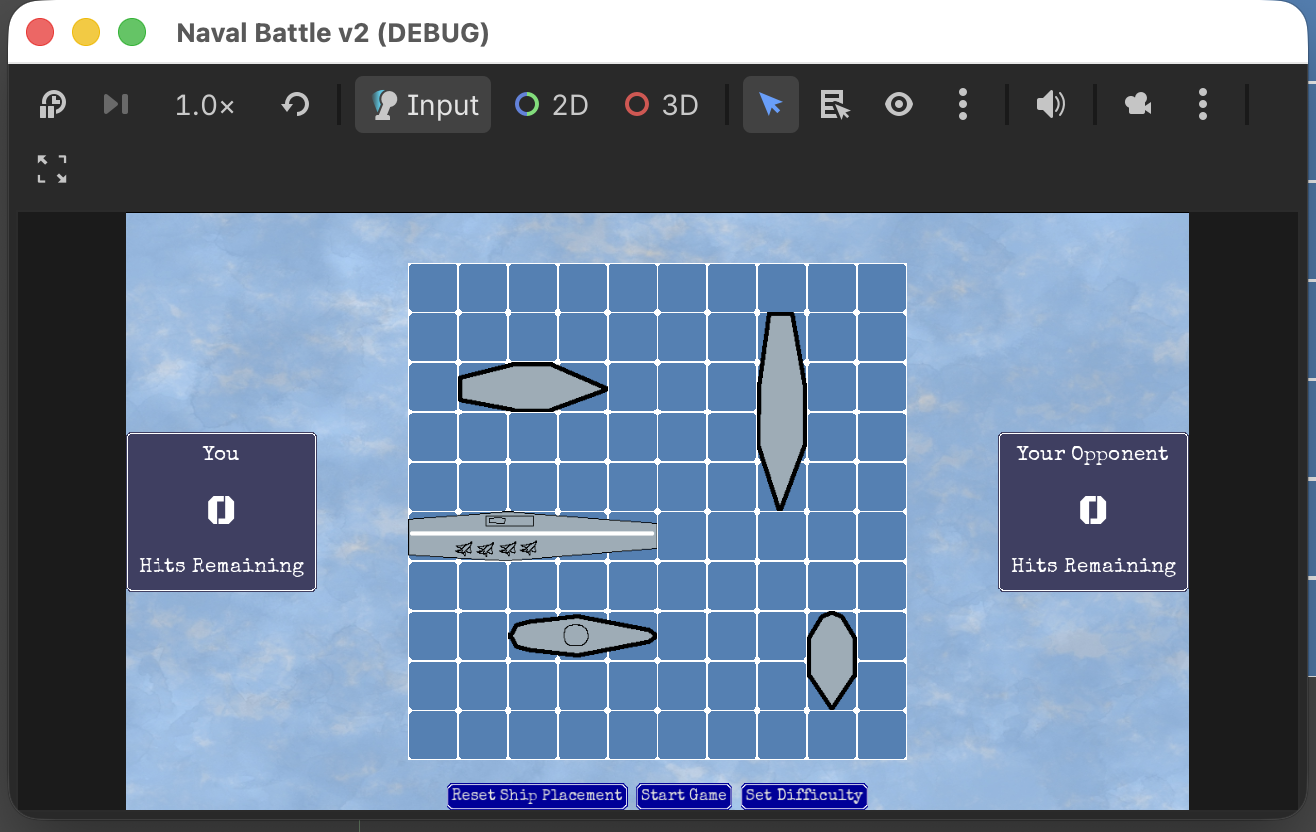
<p>This is what the game looks like at the moment:</p>

<p><img src="/assets/images/bship_20260422.png" alt="Looks better" /></p>

<p>(It’s small in the screenshot, but when played in a browser it takes up the whole window.)</p>

<p>I tried another web export of the project, and was able to play the game in my browser with zero issue. I will probably host it on GitHub pages. Hopefully by the next update I will be able to provide a link here.</p>

<p>Though there is still a lot of work ahead of me on this project, I think I got over the most significant tasks. Moving forward, this is what I still have on my kanban board:</p>

<ul>
  <li>Allow the user to change the difficulty level (the dialog box is built, I just need to display and dismiss it as required)</li>
  <li>Update the look of the difficulty dialog box and make it more consistent with the rest of the game</li>
  <li>Announce the winner on the Game Over screen</li>
  <li>Redo the ship sprites</li>
  <li>Improve the contrast between the grid and the background for low-vision players</li>
  <li>Create a splash screen to replace the default Godot one</li>
</ul>

<p>Once that is done, I will show the game to my dad to gather feedback.</p>

<p>I also have a few nice-to-have items on my to-do list:</p>

<ul>
  <li>Save the wins/losses in the browser’s local storage (which I think is supported by Godot), keep track of some fun stats like average hits needed to win, and add a statistics screen to display that</li>
  <li>Create multiple sprites for hits and misses and assign them at random to include more visual variety</li>
  <li>Add a few sound effects</li>
</ul>

<p>With my sleep having improved significantly over the past two weeks and me being low on tasks as work (which happens every year around this time), I think I can wrap this project up in the coming weeks. I may write one more of these journals, before I start working on a post-mortem.</p>

<p>Fun fact: I have no idea how many times I heard the name “Claude” last night during the co-working session. That number has to be pretty high.</p>]]></content><author><name></name></author><category term="naval-battle" /><category term="update" /><summary type="html"><![CDATA[For the past week and a half, I have been focusing on the visual aspect of my BattleShip game project. As I said before, I’m not a graphic designer (although I did consider reorienting my career towards that area about a decade ago, before my brain switched to “Reach Financial Independence ASAP” mode). So far, my process has basically been:]]></summary></entry><entry><title type="html">Playable</title><link href="https://bobbywatson100.github.io/naval-battle/update/2026/04/13/playable.html" rel="alternate" type="text/html" title="Playable" /><published>2026-04-13T23:04:40+00:00</published><updated>2026-04-13T23:04:40+00:00</updated><id>https://bobbywatson100.github.io/naval-battle/update/2026/04/13/playable</id><content type="html" xml:base="https://bobbywatson100.github.io/naval-battle/update/2026/04/13/playable.html"><![CDATA[<p>As expected, I found myself with some time this weekend, and I decided to spend a good amount of it on this (the main reason being that I am tired of having this project on my to-do list and I am ready to move on to something else, like finally finishing that custom font I started working on 3 years ago.)</p>

<p>The first order of business was to implement the Carreidas difficulty mode (aka “I’m going to cheat if I miss 5 times in a row”). I had spent some time last week thinking how I should implement this, and that paid off: Once I sat down to write the code, it took about 10 minutes, and it worked the first time with no issue whatsoever, although I did debug through it to make sure this was not a fluke. It was not a fluke.</p>

<p>The next step was to actually display the hits and the misses on the game grid. I originally built the grid using Godot’s built-in control GridContainer, each cell being a TextureRect. That too, I had spent some time thinking about last week, and I had a good idea of what to do, but this I didn’t really know how to implement it. I had an idea, but I knew Godot’s GridContainer class would not work, since it does not support superimposing children nodes. I took the lazy route here, and I asked an AI. (More on AI later.) Turns out the simplest solution is to create custom scene of type Control, with two children: one TextureRect for the background texture, and another on top of it that will be used to display either a splash (in case of misses) or an explosion (in case of hits). Creating the scene was easy enough. The problem was to change all 100 cells to a different type. Doing that through the UI is feasible, but time-consuming. My solution was to open the .tscn file in a text editor, and copy and paste the changes 100 times. This took about 5 minutes. I did run into a couple of issues when I tested the solution, but overall, this worked out pretty well!</p>

<p>When I reached that point, I ended up running my AI test scene a few times just because I enjoyed watching all the cells slowly getting filled out with splashes and explosions.</p>

<p>I also added the score display on each side of the screen to show how many hit points each player has remaining.</p>

<p>My last task for today was to make the game actually playable by processing the user’s input appropriately, making sure the cell the user clicked on had not already been tried, and testing the transitions between the various game states. This part went pretty smoothly as well.</p>

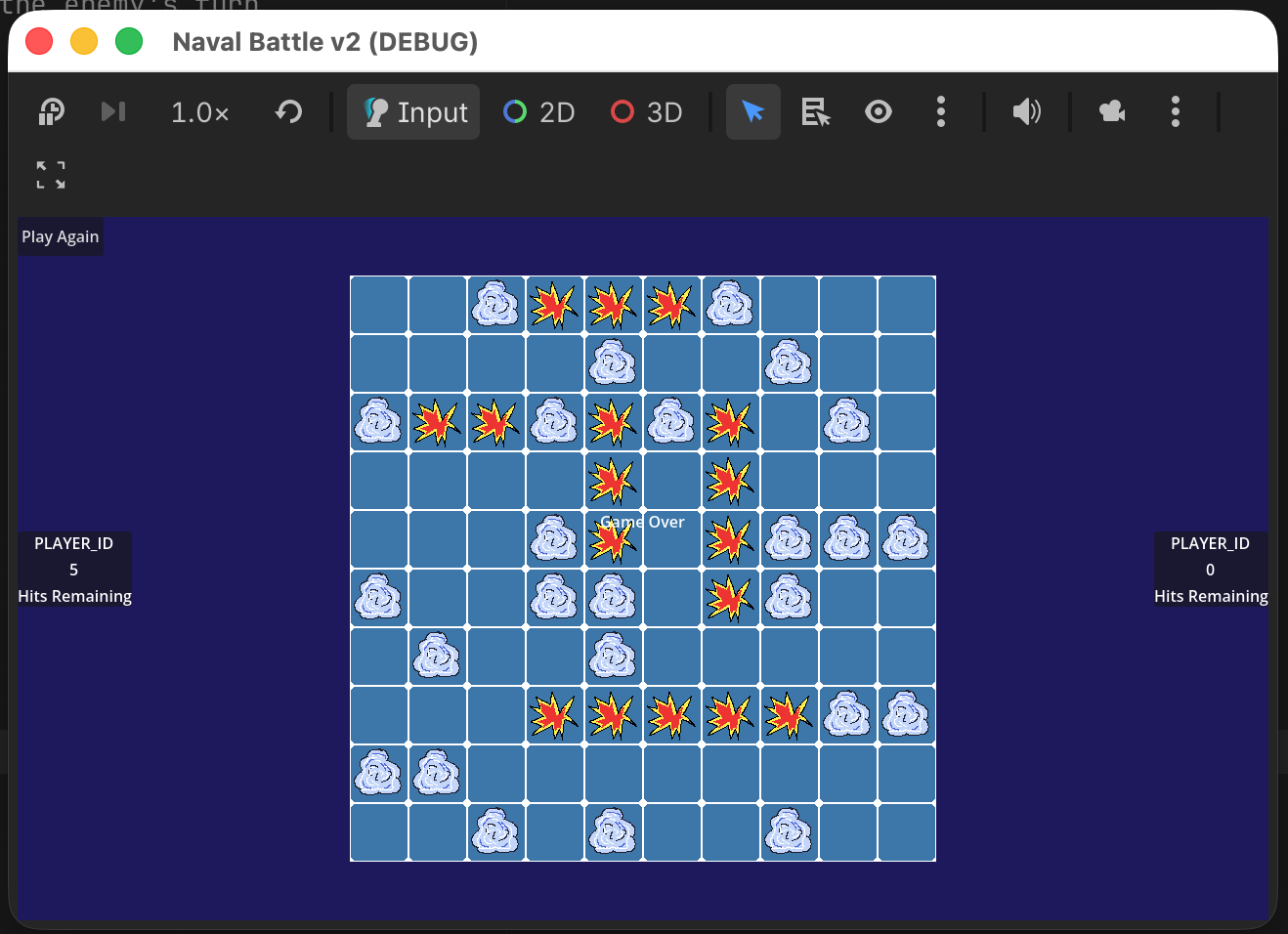
<p>At this point, the game is actually playable from start to finish! There’s even a button at the end to start over! My main task this week will be to make the whole thing slightly prettier, because right now it looks like a game designed by a middle-age programmer with no graphic design experience:</p>

<p><img src="/assets/images/bship_20260413.png" alt="The Game" /></p>

<p>(Some adjustments were made after this screenshot was taken, namely: PLAYER_ID was replaced with either ‘You’ or ‘Your opponent’ and the ‘Play Again’ button was moved to the bottom and centered. Making ‘Game Over’ more visible is on my task list for this week. And also to add styling to the text and buttons.)</p>

<p>While I am not sold in AI image generation, I have to admit I find AI very useful for coding. Asking it a coding question or to validate a solution to a problem I am facing usually returns useful results. One thing I would not ask it to do is to generate the code for me. There are two reasons for this:</p>
<ol>
  <li>One of my main objectives in tackling this project in the first place was to learn how to develop games using the Godot game engine. Asking an AI to do it for me does not help in that regards.</li>
  <li>I do not know enough to evaluate awhether the code generated is good or not, and cannot at a glance determine if it is functional. If I was at work and using the AI to generate ABAP code for me, I would not have the same concerns. I’ve been coding in ABAP for long enough, at this point I have a good idea whether what I’m looking at works or not.</li>
</ol>

<p>For most of this project, I used the free tier of Claude, but this weekend I started testing open model Gemma locally on my Mac mini. The e4b model works well, is responsive and was able to answer my questions correctly. I also tried the 31b version, but that one does not perform well with 24GB of memory (but works fine on my gaming PC with 64 GB of RAM).</p>

<p>Speaking of AI, I saw a pretty frightening notification when I checked my GitHub today: Starting April 24th, GitHub will start looking at public repositories to train Co-pilot. Luckily there is an option to opt-out. Unfortunately, GitHub defaults the setting to opt-in. Check your GitHub settings, folks!</p>]]></content><author><name></name></author><category term="naval-battle" /><category term="update" /><summary type="html"><![CDATA[As expected, I found myself with some time this weekend, and I decided to spend a good amount of it on this (the main reason being that I am tired of having this project on my to-do list and I am ready to move on to something else, like finally finishing that custom font I started working on 3 years ago.)]]></summary></entry><entry><title type="html">Opponent AI Progress</title><link href="https://bobbywatson100.github.io/naval-battle/update/2026/04/09/opponent-ai-progress.html" rel="alternate" type="text/html" title="Opponent AI Progress" /><published>2026-04-09T23:04:40+00:00</published><updated>2026-04-09T23:04:40+00:00</updated><id>https://bobbywatson100.github.io/naval-battle/update/2026/04/09/opponent-ai-progress</id><content type="html" xml:base="https://bobbywatson100.github.io/naval-battle/update/2026/04/09/opponent-ai-progress.html"><![CDATA[<p>Things at work have slowed down significantly, which means I now have more brain power outside of business hours available to move forward on my project! I have now implemented the two difficulty levels of the opponent. The first one just picks cells randomly with no strategy whatsoever. The second one, once it has a hit, will try to poke around to find the rest of the ship.</p>

<p>I built a separate scene in my project that allows me to test and debug the AI without having to play a complete game. This allows me to compare how may turns it takes for the AI to sink all the ships. With the easy difficulty, the number if turns is typically somewhere between 85 and 97 (the maximum number of turns required to cover the board being 100). The normal difficulty level varies greatly, from the mid-40s to the 80s. I also put in some code to display the state of the grid after each turn in the log, with an optional wait time between turns, and it’s been fun to see how the game progresses, turn after turn.</p>

<p>The complete implementation of this took somewhere between 3 and 4 hours, so it was not too bad. I don’t get to write a lot of code these days at work, and when I do it’s usually a simple report, so I had a good time writing this code.</p>

<p>My initial flowchart for the normal difficulty was definitely on the right track, but there were a few things missing in it. Which, to be fair, I expected. Rather than update the flowchart, I just went ahead and made the changes in the code. This project is not done in a corporate environment, I don’t have a responsibility to keep de design documents up to date, and in all likelihood I won’t use them ever again. There are definitely a few sections of the code that I will refactor in the next few days, some lines repeat and I’m not a fan of. (My current job is to reverse engineer some old code that has been written by people who loved repeating themselves for no reason, and I want to do my best not to make the same mistake.)</p>

<p>The next step is to implement the Carreidas difficulty, which should be straightforward (I just need to add a method in my grid class that picks a random occupied cell and returns it, then call this method from the opponent class). I currently don’t have plans for this weekend, and my boyfriend is working, so I should have time to complete this before EOD on Sunday.</p>

<p>Following this, the next few steps will be:</p>
<ul>
  <li>Process the player turn and evaluate if they hit or miss</li>
  <li>Display the proper icons on the grid for hits and misses</li>
  <li>Show the number of HP remaining for each player on the side of the board</li>
  <li>Decrement the number of HP as required</li>
  <li>Evaluate if the game is over and announce the winner</li>
</ul>

<p>I don’t think any of these steps will be as difficult as implementing the AI. Once they’re done, the game will be playable from start to finish. There are still a few things I want to improve on it after that (like adding sound effects, improving the transition animations between turns, etc.)</p>]]></content><author><name></name></author><category term="naval-battle" /><category term="update" /><summary type="html"><![CDATA[Things at work have slowed down significantly, which means I now have more brain power outside of business hours available to move forward on my project! I have now implemented the two difficulty levels of the opponent. The first one just picks cells randomly with no strategy whatsoever. The second one, once it has a hit, will try to poke around to find the rest of the ship.]]></summary></entry><entry><title type="html">Flowchart</title><link href="https://bobbywatson100.github.io/naval-battle/update/2026/03/22/flowchart.html" rel="alternate" type="text/html" title="Flowchart" /><published>2026-03-22T23:04:40+00:00</published><updated>2026-03-22T23:04:40+00:00</updated><id>https://bobbywatson100.github.io/naval-battle/update/2026/03/22/flowchart</id><content type="html" xml:base="https://bobbywatson100.github.io/naval-battle/update/2026/03/22/flowchart.html"><![CDATA[<p>Lesson of the week: Know the types of your variables. The main issue I was having with the drag and drop code was due to the fact that I was certain that the ships already placed on the map was stored as an array. It turns out it was a dictionary. (If I can defend myself, I wrote this code more than a year ago.) Once I figured that out, I was able to fix all the remaining issues with the drag and drop code, I brought back the ‘exclusion zone’ around the ships, and everything was fine, and the changes were committed to my GitHub repository.</p>

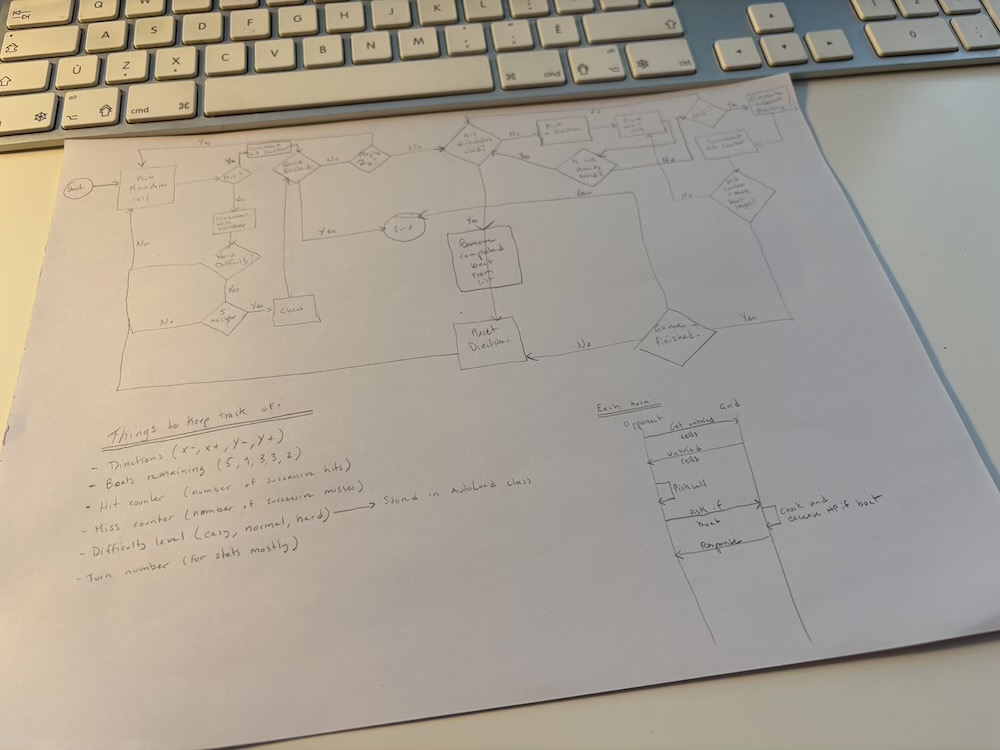
<p>I spent a few extra days planning the rest of this project. I made a complete list of everything that needs to happen at each state of the game loop. I then made a flow chart of how the AI is going to work. It is way more elaborate than I expected. I did the whole thing on paper while sitting on the couch, so it’s a bit messy:</p>

<p><img src="/assets/images/bship_ai_flowchart_20260322.jpg" alt="AI Flowchart" /></p>

<p>I think I am still missing a few steps, mostly with regards to declaring a ship as ‘sunk’ and removing them from the list of remaining ships, so I plan to spend an hour or so in Dia to make this diagram a bit cleaner and fixing what I missed on my first attempt.</p>

<p>The process of drawing the diagram gave me a very clear idea of a few things that I need to do before I jump in:</p>
<ol>
  <li>I need to modify my game grid class to add a method that returns all the cells that can possibly be picked for the next guess</li>
  <li>I need to also add a method to my game grid class to check if a guess is a good one or not</li>
  <li>Finally, I need to implement a ‘Carreidas’ method for cheating for the highest difficulty level (I could not resist adding a Tintin reference, since ‘Flight 417 to Sydney’ has been on my mind since I started this project)</li>
</ol>

<p>I implemented (but not tested) the first change earlier today, and I started working on the second. The third one shouldn’t take too long.</p>]]></content><author><name></name></author><category term="naval-battle" /><category term="update" /><summary type="html"><![CDATA[Lesson of the week: Know the types of your variables. The main issue I was having with the drag and drop code was due to the fact that I was certain that the ships already placed on the map was stored as an array. It turns out it was a dictionary. (If I can defend myself, I wrote this code more than a year ago.) Once I figured that out, I was able to fix all the remaining issues with the drag and drop code, I brought back the ‘exclusion zone’ around the ships, and everything was fine, and the changes were committed to my GitHub repository.]]></summary></entry><entry><title type="html">Slow Progress</title><link href="https://bobbywatson100.github.io/naval-battle/update/2026/03/17/slow-progress.html" rel="alternate" type="text/html" title="Slow Progress" /><published>2026-03-17T23:04:40+00:00</published><updated>2026-03-17T23:04:40+00:00</updated><id>https://bobbywatson100.github.io/naval-battle/update/2026/03/17/slow-progress</id><content type="html" xml:base="https://bobbywatson100.github.io/naval-battle/update/2026/03/17/slow-progress.html"><![CDATA[<p>Progress has been very slow for the past 2 weeks. In fact, I barely worked on my dad’s battle ship game. To be fair, I was dogsitting my partner’s dog for the first time, which made me very anxious and caused the loss of many hours of sleep. By the time I was done with the workday, my brain was barely functioning. The dog is now gone, my cats and myself can finally relax and, despite some more sleep issues caused by daylight savings, anxiety and work stress, I still felt good enough to spend some time on the project this week.</p>

<p>I thought I was done with the drag and drop. I was so, so wrong. Testing out the feature, I found a few bugs, and I am still tracking a few of them. And I decided to implement the rule saying that ships can’t be next to each other, which caused many more issues. I’m not sure how I am going to fix this yet, to be honest. I think the first step will be to comment out the exclusion zone idea, and just get the basic drag and drop working. Then I can worry about the rest.</p>

<p>I thought work was slowing down and that I would have some time to dedicate to this. On this too, I was very wrong. I did have one slow day last week, but after that, it’s been non-stop. Oh well.</p>

<p>One funny thing: I was having issues with the Godot text editor on my Mac mini. For some reason, clicking to place the cursor and selecting text was not as precise as it should have been, with noticeable delays between the click and the action being executed. I did a bit of digging, and it turns out it was an issue with Magnet, the utility I use to move windows around. I turned Magnet off and now everything works fine. Since I’m not really using Magnet all that much, I might just leave it off moving forward.</p>

<p>I printed my Kanban board over the weekend (I prefer to plan on paper for some reason) and spent some time changing the wording on a few cards. I also added a few, and built some form of vague schedule for myself. This project has been on the back of my mind for a while, and I need to get it out of the way. The goal for this week is to finalize the initial placement of ships for the player and the drag &amp; drop. The next two will be spent on the opponent AI, and the last two on finalizing gameplay and reworking the UI and the animations.</p>

<p>Though I’ve been a programmer for a very long time, and some of it does translate, I still feel like a complete beginner. It turns out making a video game, even a very basic one, is totally different from programming boring business applications. Who would have thought!</p>]]></content><author><name></name></author><category term="naval-battle" /><category term="update" /><summary type="html"><![CDATA[Progress has been very slow for the past 2 weeks. In fact, I barely worked on my dad’s battle ship game. To be fair, I was dogsitting my partner’s dog for the first time, which made me very anxious and caused the loss of many hours of sleep. By the time I was done with the workday, my brain was barely functioning. The dog is now gone, my cats and myself can finally relax and, despite some more sleep issues caused by daylight savings, anxiety and work stress, I still felt good enough to spend some time on the project this week.]]></summary></entry><entry><title type="html">Moving Forward</title><link href="https://bobbywatson100.github.io/naval-battle/update/2026/03/02/moving-forward.html" rel="alternate" type="text/html" title="Moving Forward" /><published>2026-03-02T23:04:40+00:00</published><updated>2026-03-02T23:04:40+00:00</updated><id>https://bobbywatson100.github.io/naval-battle/update/2026/03/02/moving-forward</id><content type="html" xml:base="https://bobbywatson100.github.io/naval-battle/update/2026/03/02/moving-forward.html"><![CDATA[<p>Though I did not work on my dad’s battleship game every day over the past two weeks, I have made some very good progress.</p>

<p>The first significant progress has been the complete implementation of the game loop. The game now goes from initial setup to alternating between the player and the opponent’s turn a few times, then goes to the game over screen, with a button to go back to the initial setup. The game is not actually a game yet, since the opponent’s AI is non-existent, all the game does on a player’s turn is to check whether the click occurred within the grid, and there is no actual winner yet.</p>

<p>I’ve also completed the import of the objects from my first attempt at the game into this new project and, after some minor changes, I got the following items off of my Kanban board:</p>
<ul>
  <li>Display an actual grid rather than my initial placeholder coloured rectangle</li>
  <li>Place the ships randomly on the grid for both player and opponent</li>
  <li>Allow the player to move the ships on the grid by dragging and dropping them during the initial setup phase</li>
  <li>Create a new scene so I can develop and test the opponent’s AI efficiently</li>
</ul>

<p>Speaking of the opponent’s AI, this will be my main area of focus next, as I have identified it as the last major step in the development. One thing that has been on my mind in the past few days is: Is it allowed to place ships next to each other on the grid? I asked Claude this morning and, while apparently Hasbro’s rule set allows it, it is a common house rule to not allow it. I am inclined to include this house rule for now (and maybe make it optional later). The main reason why it’s on my mind is that it has serious implications in the implementation of the AI itself, allowing it to know which ships are left. Not knowing this means that it could waste several turns (e.g. if the AI knows that the carrier is already sunk and has just completed a row of 4, then it won’t go for the 5th and instead choose to hit a random cell instead). This house rule also reduces the number of possible cells to hit. This also means that I need to change a few things in my drag and drop implementation, but that should not be a very hard thing to do, since my algorithm for random placement already has an exclusion zone around each ship.</p>

<p>I ran into a couple of issues in the process, of course. One I am stil, working on is to place the ships on the board randomly on the start of the game. Due to how my scenes are set up, I cannot use the ready function in my script. I have an idea (and Claude has suggested a few things as well), but I haven’t focused on that yet, since I don’t think it’s a high priority (although I do need to get that fixed before I show the game to my dad).</p>

<p>As stated above, I next plan to focus on the AI, which I think should take the better part of a week (maybe more). Things at work are starting to slow down again (I’ve had this job for a few years, and each period of activity is usually followed by some down time with very little to do), so I should be able to squeeze in a few half-hour sessions of development here and there between meetings. I did write an algorithm for the AI, so I know what I have to do, I just need to sit down and do it.</p>]]></content><author><name></name></author><category term="naval-battle" /><category term="update" /><summary type="html"><![CDATA[Though I did not work on my dad’s battleship game every day over the past two weeks, I have made some very good progress.]]></summary></entry><entry><title type="html">The humble beginnings</title><link href="https://bobbywatson100.github.io/naval-battle/update/2026/02/14/the-humble-beginnings.html" rel="alternate" type="text/html" title="The humble beginnings" /><published>2026-02-14T23:04:40+00:00</published><updated>2026-02-14T23:04:40+00:00</updated><id>https://bobbywatson100.github.io/naval-battle/update/2026/02/14/the-humble-beginnings</id><content type="html" xml:base="https://bobbywatson100.github.io/naval-battle/update/2026/02/14/the-humble-beginnings.html"><![CDATA[<p>About a year ago, my father asked me to find him a Battle Ship game for his computer, since he was getting tired of playing Queen of Spades on his computer. I tried looking for one. I’m sure there’s plenty of them but, for whatever reason, I could not really find one. My dad also has very low vision, so I needed one that was easy for him to use. So I thought, “Hey, this seems simple enough, I could probably make one myself”. And so I downloaded the Godot game engine (since it’s the one engine I’ve been meaning to learn) and got to work.</p>

<p>That was last year, around May. Nine months later, that game still does not exist. Now, back then, I put in a serious effort, and had several features already implemented:</p>
<ul>
  <li>Display the player board</li>
  <li>Display the list of ships to place on the side of the screen</li>
  <li>Allow the player to drag the ships and drop them on the board</li>
  <li>Allow the player to rotate said ships by double-clicking on them</li>
  <li>Allow the player to place the ships randomly on the board with one click (and make sure none of them were contiguous)</li>
</ul>

<p>And that’s pretty much where I stopped. I ran into some problem I can’t remember, and thought I would get back to it a few days later. Of course, I never did.</p>

<p>Now, months later, I decided to take a second crack at it. This time, I am taking a different approach. Instead of starting with the placement of the ships, then implementing the turn order, I am going to do the whole game loop first. What that means is that, after that first step, I will have:</p>
<ul>
  <li>A basic screen with a placeholder grid, and a button that allows for the game to start</li>
  <li>A transition from that starting screen to a screen that allows the player to click somewhere on the enemy’s grid</li>
  <li>After the click, another transition goes from the player’s turn to guess to the enemy’s turn to guess</li>
  <li>A short timer to simulate the enemy thinking, then reverting back to the player’s turn</li>
  <li>Loop from the player turn to the enemy’s turn a few times</li>
  <li>Display a game over screen</li>
</ul>

<p>Once I have this running, then I will start bringing in what I had in last’s years attempt. I haven’t taken a look at my old project recently, but I think a lot of what I did can be imported and reused (with some refactoring of the code). My algorithm for random ship placement is still good enough. My drag ‘n drop code should still be usable.</p>

<p>At this point of the project, the only big issue I see is the enemy AI. I want to have three distinct levels:</p>
<ul>
  <li>Easy - At this level, the enemy just picks random cells in the grid with no logic to it</li>
  <li>Normal - At this level, the enemy picks random cells and, once it has a hit, then focus around the hit until the ship is destroyed</li>
  <li>Hard - At this level, the enemy cheats. After 3 failed guesses, the 4th one will always hit, and then it will focus around the hit until the ship is destroyed</li>
</ul>

<p>I put in a few hours this week, and I am actually very close to having the full game loop implemented. I think another hour or two of work will get me there. Once that is done, I will experiment with Godot’s web exporter, since I think this will work well as a web game. It also means I can just add a shortcut to it in my dad’s web browser and never have to worry about having to install updates.</p>

<p>I have not set a deadline for this project. If I spend 20 to 30 minutes a day on this (and maybe a bit more on weekends), I think I can get it done in about a month. My goal is not to make it pretty. My goal for now is to just make a functional version of the game. Once it’s working, I plan to show it to my dad, and then start customizing the visuals according to his special needs.</p>

<p>This time I made a Kanban board in my Obsidian vault to help me track my tasks. I’m the only developer on the project, so it doesn’t matter that much, but I want to develop good habits that will be useful once I start working on a bigger game project.</p>]]></content><author><name></name></author><category term="naval-battle" /><category term="update" /><summary type="html"><![CDATA[About a year ago, my father asked me to find him a Battle Ship game for his computer, since he was getting tired of playing Queen of Spades on his computer. I tried looking for one. I’m sure there’s plenty of them but, for whatever reason, I could not really find one. My dad also has very low vision, so I needed one that was easy for him to use. So I thought, “Hey, this seems simple enough, I could probably make one myself”. And so I downloaded the Godot game engine (since it’s the one engine I’ve been meaning to learn) and got to work.]]></summary></entry></feed>