Playable
As expected, I found myself with some time this weekend, and I decided to spend a good amount of it on this (the main reason being that I am tired of having this project on my to-do list and I am ready to move on to something else, like finally finishing that custom font I started working on 3 years ago.)
The first order of business was to implement the Carreidas difficulty mode (aka “I’m going to cheat if I miss 5 times in a row”). I had spent some time last week thinking how I should implement this, and that paid off: Once I sat down to write the code, it took about 10 minutes, and it worked the first time with no issue whatsoever, although I did debug through it to make sure this was not a fluke. It was not a fluke.
The next step was to actually display the hits and the misses on the game grid. I originally built the grid using Godot’s built-in control GridContainer, each cell being a TextureRect. That too, I had spent some time thinking about last week, and I had a good idea of what to do, but this I didn’t really know how to implement it. I had an idea, but I knew Godot’s GridContainer class would not work, since it does not support superimposing children nodes. I took the lazy route here, and I asked an AI. (More on AI later.) Turns out the simplest solution is to create custom scene of type Control, with two children: one TextureRect for the background texture, and another on top of it that will be used to display either a splash (in case of misses) or an explosion (in case of hits). Creating the scene was easy enough. The problem was to change all 100 cells to a different type. Doing that through the UI is feasible, but time-consuming. My solution was to open the .tscn file in a text editor, and copy and paste the changes 100 times. This took about 5 minutes. I did run into a couple of issues when I tested the solution, but overall, this worked out pretty well!
When I reached that point, I ended up running my AI test scene a few times just because I enjoyed watching all the cells slowly getting filled out with splashes and explosions.
I also added the score display on each side of the screen to show how many hit points each player has remaining.
My last task for today was to make the game actually playable by processing the user’s input appropriately, making sure the cell the user clicked on had not already been tried, and testing the transitions between the various game states. This part went pretty smoothly as well.
At this point, the game is actually playable from start to finish! There’s even a button at the end to start over! My main task this week will be to make the whole thing slightly prettier, because right now it looks like a game designed by a middle-age programmer with no graphic design experience:
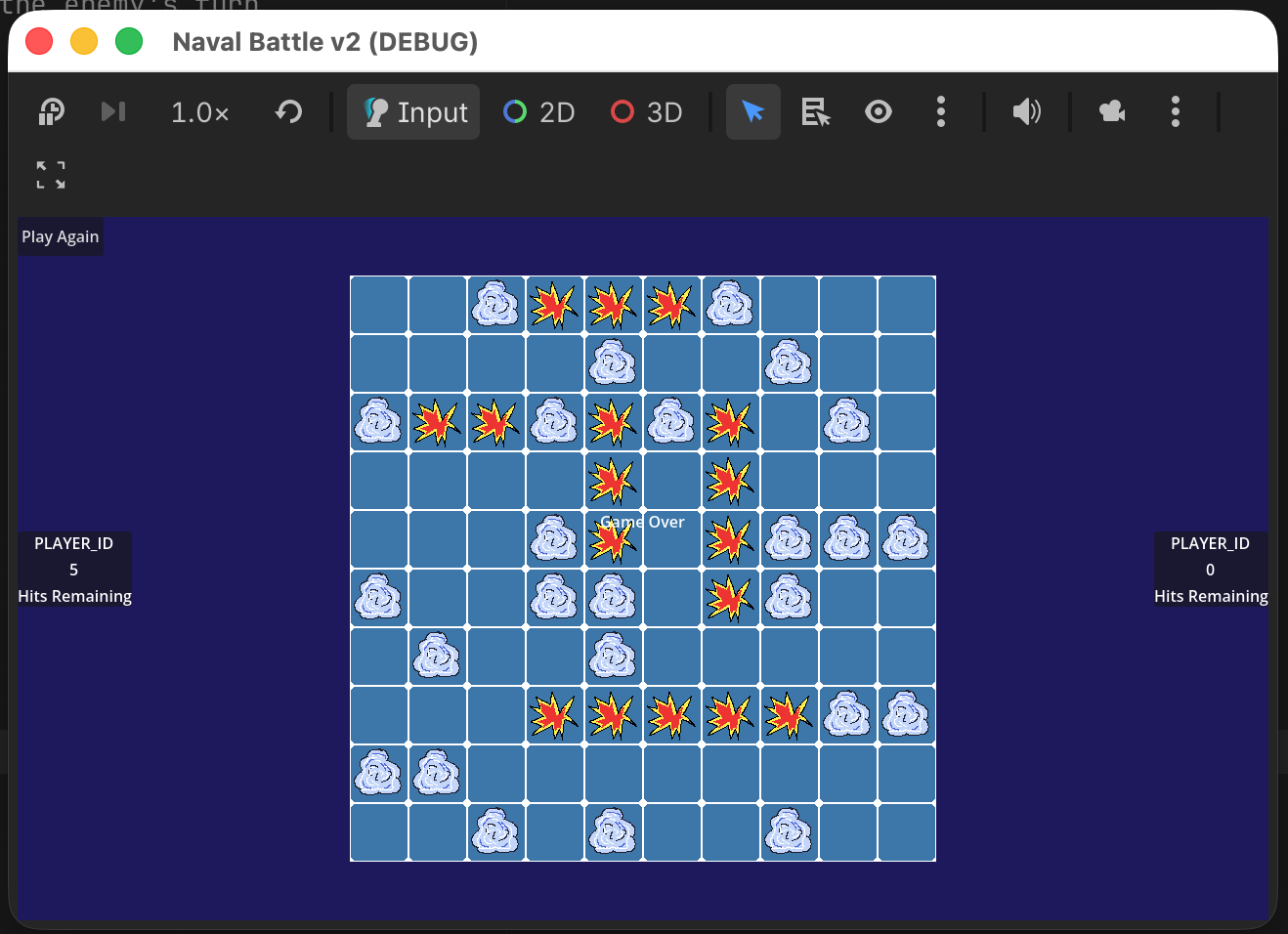
(Some adjustments were made after this screenshot was taken, namely: PLAYER_ID was replaced with either ‘You’ or ‘Your opponent’ and the ‘Play Again’ button was moved to the bottom and centered. Making ‘Game Over’ more visible is on my task list for this week. And also to add styling to the text and buttons.)
While I am not sold in AI image generation, I have to admit I find AI very useful for coding. Asking it a coding question or to validate a solution to a problem I am facing usually returns useful results. One thing I would not ask it to do is to generate the code for me. There are two reasons for this:
- One of my main objectives in tackling this project in the first place was to learn how to develop games using the Godot game engine. Asking an AI to do it for me does not help in that regards.
- I do not know enough to evaluate awhether the code generated is good or not, and cannot at a glance determine if it is functional. If I was at work and using the AI to generate ABAP code for me, I would not have the same concerns. I’ve been coding in ABAP for long enough, at this point I have a good idea whether what I’m looking at works or not.
For most of this project, I used the free tier of Claude, but this weekend I started testing open model Gemma locally on my Mac mini. The e4b model works well, is responsive and was able to answer my questions correctly. I also tried the 31b version, but that one does not perform well with 24GB of memory (but works fine on my gaming PC with 64 GB of RAM).
Speaking of AI, I saw a pretty frightening notification when I checked my GitHub today: Starting April 24th, GitHub will start looking at public repositories to train Co-pilot. Luckily there is an option to opt-out. Unfortunately, GitHub defaults the setting to opt-in. Check your GitHub settings, folks!